Monday, August 4, 2014

setting safety stock levels in line with the supply chain strategy

one of the critical success factors in supply chain management is the correct translation of a supply chain strategy into materials planning policies. Take as an example a directive to provide a certain service level to the customers. Management might say "we want to achieve a 98% fill rate on our most valuable products" (usually A items).

What usually happens then, is that every materials planner figures out how much inventory they need to hold and what replenishment policy to use to achieve that. If you want to standardize this kind of directive and develop a system to have everybody use the same calculation, I suggest you use the field 'service level' in MRP2 and calculate the safety stock setting for each material using the variables lead time, mean absolute deviation and a safety factor. 

You can do this on the forecasting screen of the material master. Depending on how you configured your MRP type, the forecast run can calculate  safety stock level for you. However, you have to kind of doing this for every material and you can only simulate exactly one service level.

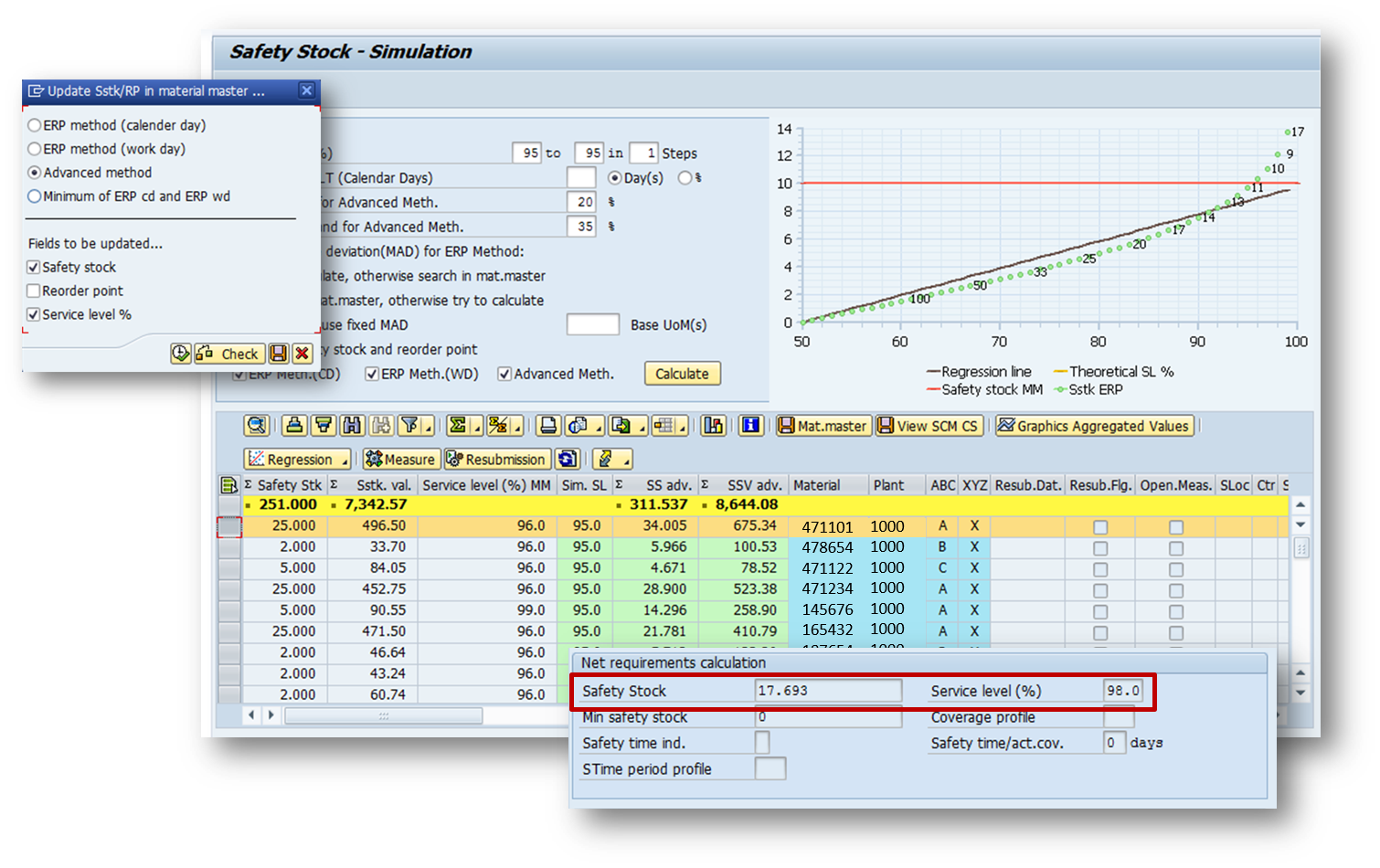
A better solution is the SAP Add-On Tool 'Safety Stock and Reorder Point Simulator'. With it you;re also getting a new KPI: safety stock value! You can also simulate many service levels and compare the results in terms of quantity and value. On top of everything else, the safety stock calculation gives you two more - very important - parameters: the variation in replenishment lead time and a variation in demand.

Let's say management desires a service level to the customer of 95%. In that case you would pull all those materials into the simulator, set 95% nd your variation in lead time demand and click the 'calculate button. The simulator then calculates all safety stock individually for each materials and totals the value. This way you can determine what a 95% service levels means compared to your current master data settings or to other service levels. In our example, all materials currently have a service level of 96% which, with the manual calculation the materials planner was using, produced a value of $7,342 in safety stocks. However, the safty stock simulator produces a value that's higher with a lesser service level... and that calculation is using the same variables for each material across the board and therefore probably much more accurate than what the planner ever can come up with - possibly applying different methods and being totally overwhelmed doing this for hundreds, if not thousands of materials.

In the end, you push the save button and safety stock and service level are being updated into the MRP2 screen for each and every material in the list.

Management changes their mind tomorrow? no problem!

Saturday, August 2, 2014

how to use detailed scheduling in SAP-REM for the automated generation of a weekly production program

One of my favorite clients runs a mix of production orders and repetitive manufacturing. As I visited their distribution center last week, I saw that they have a fairly simple assembly and kitting operation going on in the warehouse before the ship bundled spare part kits to the customer or the manufacturing plants.

My suggestion was to use repetitive manufacturing for the scheduling of the assemblies (and kitting) to make it easy and automated. With only little customizing necessary, we put the whole thing together within 3 days. Actually, the only customizing effort that was required was for the layout key and a setup matrix (using setup group category and setup group key), so that we can dispatch a sequence that is build automatically according to 'like' setups.

The first thing we did was switching from reorder planning to the deterministic PD. the previous V1 had the effect that inventory holdings (how much to put into the reorder level) had to be calculated based on the two demand sources:
- Stock transport order requests from Manufacturing Plants
- After Market requests from Customers
With a changing demand situation it was very difficult to find the right reorder point and assembly was only triggered when a reorder point was broken. Since then a forward scheduling is executed, the inventory left, after the reorder point was broken, had to be enough to fulfill the demand. This is a very difficult planning situation and requires a lot of inventory.

That is why we decided to plan these products with PD, where future demands (from STOs or customer orders) result in the generation of supply orders in exactly the quantity and exactly the date, they are demanded. Using safety stock to buffer any variation in lead time and demand, we can now schedule production to exactly meet demand. With a fixed lot size FX that corresponds in quantity to the smallest possible run, the MRP run generates supply proposals into the order pool that are a multiple of the minimum run quantity. In scheduling we can then flexibly sequence run quantities in feasible lot sizes

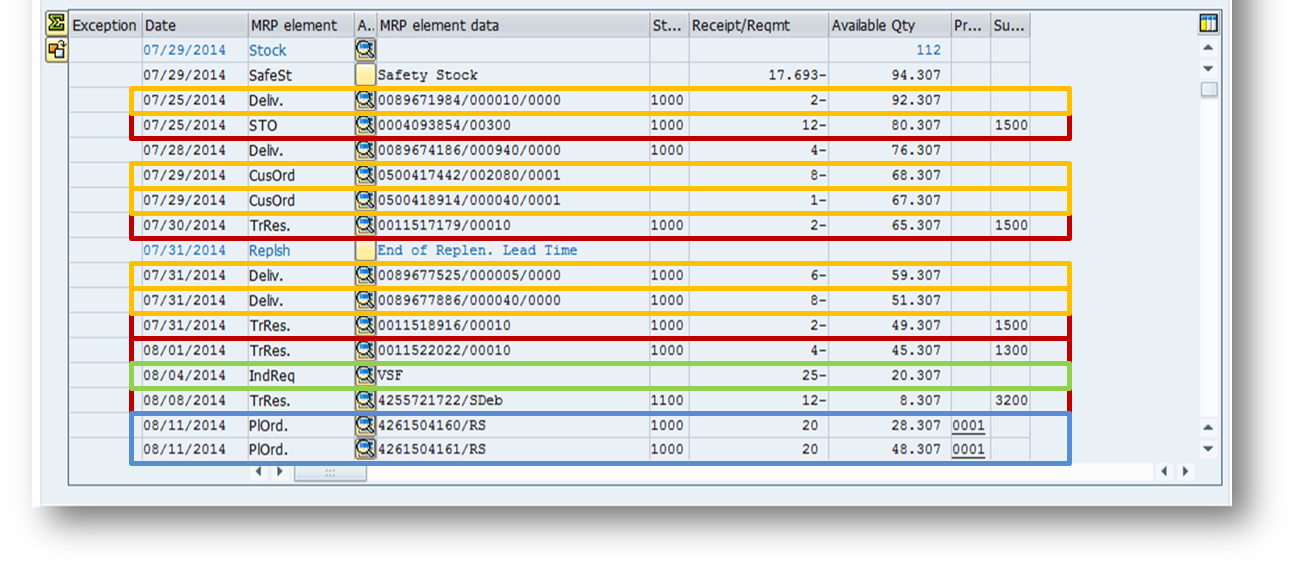
after the MRP run you can then see all the various demand elements in MD04 and the supply that covers them.
Now we can move onto scheduling and in MF50 we can see - tabular or graphically how MRP, which works without any consideration of capacity, sequence or material component availability, fills the pool of orders.
using the previously customized layout key for sequencing according to 'like' setups, we can now simply select three weeks worth of orders and click the 'dispatch button. The system uses the sequencing profile and first sorts all the orders and builds a sequence, then it distributes the orders within the limits of available capacity defined in the individual work orders.

Note that there are three work centers that can be scheduled. If you define alternative routings and production versions, you can use the dispatching strategy in a way that, in case of missing capacity, the dispatching can resort to another work center and therefore perfectly distribute the orders.

since we are working with repetitive manufacturing, there is no need for a planned order conversion to production orders. The orders you see here are executable. Now you may perform a collective availability check using MDVP on the schedule and expedite missing parts for next week.

All that's left is MF51 where you can prnt the schedule and hand it to the operator who will be happy to receive instructions on a feasible plan that's checked for capacity and materials availability.

Saturday, July 12, 2014

It's more than just football (and yes, it's called football)

As I am looking forward to the World Cup final tomorrow, the world around me has no other thought (at least the world where I am right now). I am currently in Germany, in the Black Forest, where I was born. The excitement about the match against Argentina is without bounds and the unbelievable game against Brazil will not be forgotten in a long time - if ever. However, in my chosen home - New York City - and the United States of America, there are probably many more things that are of interest tomorrow. There was a burst of excitement going on and many people were talking about the 'rise of American soccer', but, as always when the team gets eliminated from the World Cup, the attention quickly shifts to other (American) sports or worldly events.


In my personal opinion, US football will never dominate the world - and that is the problem. Americans need to be the best and if they're not, they will consider it uninteresting, not important, less challenging. Focus is lost and if you don't focus, you can't become the world's best. In football nations like Brazil, Argentina, Italy, the Netherlands, Uruguay, Spain, Germany there are very elaborate programs to support and focus on the youths. In the US, if there is a good young athlete, they focus on the usual suspects... american football, basketball, baseball, hockey. And that's also where the money is. Besides, the US does not have the football IQ necessary to rise towards becoming a football nation. Attempts like bringing in Klinsmann or some old players from European clubs into MLS are not enough. You would need a structure underneath. In Germany, the DFB develops support programs, provides detailed seminars for youths coaches, has talent events and raises tomorrow's superstars through a program that starts at age 8 and stands by their sides until they finish school.

But that is quite alright. The US does not need this kind of football. They have their own.Tomorrow, however, it's our (the rest of the world) day and (besides some dutch coach) the entire football world will watch the culmination of a world event that takes place only every four years and never produces surprises (another reason this will never become a US major event). It's always the same old suspects n the semi finals. Brazil, the Netherlands, Argentina, Italy, Germany, Spain, maybe Uruguay, also England or Hungary a long time ago.

Was the game Brazil - Germany a surprise? Definitely when considering the score. But if you look underneath you can clearly see that Brazil did not have a plan and Germany did. Emotions alone is what was driving Brazil and Germany executed on a step by step program. Just review the first goal: It was a set piece situation... a perfectly executed corner kick. Thomas Mueller, shadowed by David Luiz, was moving towards the back goalpost. When David Luiz was trying to follow, Miroslav Klose stood in the way and Mueller was open to score the 1:0.

What happened after that is history and we don't know all the tactics, little tricks and moves the players were executing so perfectly, but this time it worked and the Brazilians were taken by complete surprise and had nothing in the cards to avoid the unthinkable - emotions had taken over their preparation and that is why football is more than just football. It's not just the goals that are interesting in a football game. Even more it's all the little things that happen in between.

Football is culture, Italy will always beat Germany when it counts. The Spanish will either play like gods or disappoint like hell - nothing in between. Brazilians can not be successful without the child-like, beautiful, awe-inspiring samba football that they tried to replace with sober, tough and aggressive play that was adopted over the past few years. They will have to reinvent themselves and go back to what they are. The English? Well, that's another story... and the Netherlands will have to find a solution too. They played three Finals, always have an excellent team and never go all the way. Why? I do not have a clue and that's the beauty about this sport: it;s complicated and impossible to understand. Non-followers always try to figure it out during the World Cup for them it's easy: Whoever wins was the better team and if a game has a low score it wasn't good.

There is so much more to this sport and there must be a reason for it to be the most followed in the world. I tried to figure it out since I was watching my first world cup at the age of 9, playing the sport myself and still following it until I die. But I will never fully understand what exactly is going on when Germany dismantles Brazil within a few minutes. And that is beautiful, exciting and interesting to me (no, I don't mean the dismantling - I love Brazil).

Tomorrow is huge. My team is in the Final ! and they might be the favorite because of that semi final. But this is football and we don't know what those smart people that make this sport so exciting, memorable and beautiful have in the cards for us.

May somebody win. Go Football !!

Friday, June 20, 2014

introducing flow into production

Did you know that SAP-ERP offers excellent functions and tools to implement flow? These functions are well hidden (I really don't know why) and not documented too elaborately. So let me take a shot here to introduce you to that kind of functionality and maybe you find it useful for the scheduling of your production line. It's probably taking me a couple of blog posts before I get the entire process together, so here is part 1:

Flow is usually desired on production lines which manufacture products in a sequential fashion. There may be feeder lines for components and these, more often than not, make products available for final assembly or, as in process manufacturing, the packaging lines. So, very often you have a value stream that look something like this...

In this example, two feeder lines flow into the main line and the finished product is held in a Kanban super market. As you can see, the processing times at the various work stations are all different, and therefore WiP will build up in front of some stations and other stations will starve... if the line is fed jobs without WiP control. 

And here I'd like to point out a few things:

First: A push system is defined by the fact that the Throughput is controlled (scheduled) and WiP is measured. On the other hand, in a pull system WiP is controlled and Throughput is measured. This is a fundamental statement (from the people at Factory Physics) to describe the difference between push and pull.

Second: A Kanban control cycle does not guarantee pull. The disadvantage of a Kanban system is that when the container is empty, Kanban simply says "make me", and does not tell us when or in what sequence to make the product. So you'll end up with a bunch of jobs at the beginning of the line and no one knows in what sequence and at what time to introduce the jobs into the line.

So back to push or pull... if you do what many companies do, you collect the Kanban cards at the beginning of the line and tell the people who introduce the jobs into the line to start that job first that is furthest behind (often Kanban cards are stacked into a board where each product has its own column. If a products Kanban cards pile up to push these above a red line, then that is taken as a signal for highest priority). As a result, the jobs are introduced according to what's needed at the supermarket and not according to what's flowing the line.

Look what happens in the line when you keep starting jobs...
... WiP builds up in front of the station with the longer processing time. The WiP corresponds to the difference in processing time and it increases with every new job introduced...

...and grows without bounds!

Meanwhile other stations are starving because their processing times are shorter and the previous station can't feed them fast enough. As a result, if you look on the shop floor, there is WiP everywhere, therefore it takes long until the finished product shows up at the supermarket (Mark Spearman from Factory Physics calls WiP 'visible cycle time'), and t looks like you never get what you need.

So what can you do to flow the line? You need to control the WiP and make sure that you only introduce another job into the line if there is room in the line to let it flow! The way I recommend doing this in SAp is the following:

1. Figure out a future forecast for the Kanban supermarket. Based on the forecast you can calculate the Kanban quantities for each product. You are also using that forecast to create a sequence for your product mix, but before you do so...
2. Balance the line (SAP transaction LDD1) and create a product mix with rates that exactly meet the forecasted demand. In LDD1 you can use the forecast to calculate a needed product mix and bottleneck rate that stays below the maximum rate the production line can take.
3. Based on this production rate we can now figure the takt time (the inverse of the production rate) by which we need to introduce the jobs into the line - this is the time we need to wait before we let another job into the line. If we do that, the jobs can flow through the line without getting stuck, because we gave each station a work content that allows for the line to flow (if nothing unforeseen happens in the line)
4. Now we put together the planned sequence of the jobs (with SAP transactions MF50 or LAS2). This can be done using setup optimization, heijunka or a FIFO lane.

What's important here is that we use this planned sequence ONLY to procure raw materials for the schedule and to reserve capacity on the line (yes, this is capacity planning... ). We are not executing - or introducing jobs into the line - by the plan, but rather wait for the Kanban signal. Therefore...

5. Use a replenishment strategy in the control cycle that does NOT create an order, but rather looks for an order on the Sequence and attaches itself to it.

Now we have a system that is controlling WiP - because we only introduce a job into the line when one comes out - adheres to a planned sequence that guarantees material availability and enough capacity, and  is demand driven to avoid the waste of overproduction.

Sounds too simple to be true? I try to get into more detail in follow up blogs... but it works! with standard SAP!


Tuesday, June 10, 2014

moving my Harley Davidson from Las Vegas to Denver!

Last fall I had my bike serviced in Las Vegas and got so busy, that I wasn't able to move her around. Last Friday the opportunity arose from a gig in Portland, OR and I was able to free up 5 gorgeous days to move her to Denver.

Here are some impressions from the trip from Las Vegas to Denver. Sophie will stay in Denver for the summer, so I can come back and enjoy some trekking before heading her south for the winter...


Friday, May 16, 2014

Have we SAP consultants forgotten why we do what we do?

The people who read this maybe aren't the SAP using customer and therefore you might strongly disagree with me. But before you jump my throat, ask yourself: “Is what I do really helping the customer in their efforts to use SAP software for their core business?” (and don't get me wrong, there is plenty of very valuable work done to support the customer outside of their core business - but I am talking about why customer buy SAP software in the first place: to support their core business!)

To answer that question we should first identify what the core business is. The customer that I am talking about here, is a company that transforms raw materials into a finished product (or service) that they sell. So their core business is ‘transformation’ and they need to do that in the most effective way using stocks, resources and time.

According to that definition you might now say “we are selling extraordinary technology to do just that!” Great. You also installed that technology at the customer site and they have now mobile devices that foster a full inventory report, run MRP on HANA, can use scheduling heuristics and see graphics that show forecasts and sales activity.

But does the user know how to set a planning policy that drives great service levels and low inventories for that transformation? Does their SAP functionality support lean manufacturing? Yes it does, but no one knows how to use it.
I put out a statement here: “100% of all SAP using companies use the software’s capabilities to less than 80% and 98% of all SAP using companies use the software’s capabilities to less than 40%!”

Wow! If that is true, shouldn't we all shift our focus a bit?

And it is true in what I see when I visit customers: I NEVER come across a company that uses the availability checking rules correctly. I NEVER see a company that does automated policy setting. I have NEVER seen SAP production scheduling supporting ‘flow’… to just name a few.

I’d greatly appreciate any comments to get this conversation going

Tuesday, May 13, 2014

using a reorder procedure for inter plant stock transfers... whats the lead time?

Yes, you can use a reorder point procedure for inter-plant stock transports, but be careful what you put into the lead time.

When you source materials from one of your own plants, your lead time (in the field Planned Delivery Time  (in the delivering plant) should be the time it takes from the issue in the delivering plant until it arrives at the receiving plant. The only question is: Can the delivering plant issue right out of available stock?

If the delivering plant does not keep the product in stock but has to procure it also, then the total lead time until it arrives in the receiving plant will increase dramatically. But if you put that total time into the PDT, you will ask the delivering plant to issue way too early. Unfortunately the TLRT in MRP3 does not work with procurement indicator 'F', so what can you do?

I know people have played around with source lists and info records but if you want to use an automatic reorder point calculation (VM or V2) you need to put the total replenishment lead time into the PDT, because that is what the reorder point calculation uses. So you are stuck with a manual reorder procedure (VB or V1) and you will have to include the entire total replenishment lead time in your spread sheet calculation.

The SAP Add-On Tools (MRP Monitor and Reorder Point Simulation) give you added possibilities: Since the MRP Monitor also performs an EFG classification for lead time - and lets you pick the TRLT from the MRP3 screen - you can build a list of items which are feasible for an auto-reorder procedure (X - consistent consumption, C - low consumption value, E - short lead times). The Safety Stock and Reorder Point Simulator then lets you calculate and simulate various service levels for optimized reorder points and safety stock settings... and allows for a mass update of the policy.

for more info on the SAP Add-On Tools refer to the www.bigbytesoftware.com website or check out my YouTube channel.

Saturday, April 26, 2014

Effective Materials Planning with the MRP Monitor

The outcome of Materials Planning depends to a very large part on the policies you set for the individual materials. Supply chain optimizers in SAP teach a lot about policy... should you use a reorder point procedure, a PD pr maybe a material forecast to tell MRP when to order how much? They also go into what lot size procedure is fitting and how to determine a safety stock and in some other cases they suggest a dynamic safety stock calculation with a range of coverage profile.

Those are all valid and absolute necessary teachings, but the question is: what do you do with your portfolio once you understand all that and know what to set up? If someone tells you to go to the LIS to find out - for each material individually - if there is consistency in consumption, go to document evaluations to run a dead stock report that takes up hours, look in the material master what the replenishment lead time is and expects you to then set up policy for every one of your 5,000 materials... run! You should certainly not pay for that because as soon as they're gone you will find out that the materials controllers will give up on that impossible task.

Unfortunately, in SAP you can not perform an XYZ analysis for consumption consistency or a life cycle classification. And unfortunately, in SAP you can not update a group of materials with a common policy (except with the MRP Group on the MRP1 screen. But that record has only a limited amount of fields available and does not allow for the setting of a complete policy). So you would have to go to many different transactions to carry out your analysis and some things you would have to do in Excel.

The solution is the SAP-developed MRP Monitor. It doesn't come with the standard sofware, but it is developed within SAP by SAP. The MRP Monitor runs every month and classifies your entire portfolio into six dimensions - ABC for consumption value, XYZ for consumption consistency, EFG for lead time, UVW for price, LMN for volume or size and life cycle class. Once the segmentation / classification is done, you hit a button and the class is saved in every material.

What a materials planner can do now, is to pick all the materials in one class and give it a fitting policy - to all of them at once. You can do that manually by filling in the according fields in MRP1 to MRP4, the work scheduling screen and the forecasting screen, or you save the policy in the provided table and let the system do the work. Following you can see the table with pre-configured policies that the MRP Monitor uses to update entire groups of materials

Now, you'll have to go slow with this type of mass update and make sure you understand everything that's happening here. In my engagements I sometimes suggest to break down the portfolio into three buckets:
- XX3 where you can put all materials with no consumption over the past 12 months - I then update these with the policy "PD with no safety stock" so that we don't hold inventory on any of them
- then there is bucket 2 - XX2 - in which all active items remain. You can the run the MRP Monitor and pick a class for which you know the policy. as an example pick all C (low risk), X (high consistency in the past) and E (short lead times) and provide all of them with the policy "V2 (auto reorder), FX (fixed lot size), forecast data (for reorder and saftey stock calculation) and MRP Controller XX1". That will update all these materials with a fitting policy and puts all of them into the bucket XX1
- now you can update the policy for the XX1 bucket automatically by saving previously mentioned "V2" policy in the table. as long as the criteria remains the same - C,X, E - we can calmy watch how the automatic policy update does its magic.

This way you can gradually move from manual activity (without the MRP Monitor), to focused analysis and  manual policy updates for groups (in bucket XX2) to fully automated and effective materials planning in bucket XX1.


Saturday, April 19, 2014

Lean Manufacturing with SAP-ERP

Companies perform lean projects all the time... and, at least per my experiences, very rarely do they connect the principles with their ERP system. This is probably due to the fact that lean gurus, consultants and prophets very often do not care about ERP and neither do they think that ERP is necessary. Is it really true that once you implement lean, you don't need an ERP anymore?

I think not. There must be some element to report cost back to an accounting or costing system and self-controlling systems with visual feedback on the shop floor are working in some cases but not in others. Besides, you'll have to plan some things... if you let Kanban control itself and let it create signals to replenish, you will have to make sure the raw materials are available and you have free capacity. One-piece flow seems like a nice concept, but not everybody is like Toyota and when you make fancy faucets, you'll have to batch the fabrication of components, because you can't 'flow' rivets one piece at a time. Some setup optimization and sorting in the schedule is mandatory.

Nevertheless, you can and should make an effort to 'lean' your shop floor if you want to stay competitive. Avoiding the waste of overproduction, manufacture to actual demand and flow with a 'takt' based scheduling system, 'pull' from supermarkets and introduce an inventory / order interface at the right location. Those are all lean improvements that can be handled in standard SAP-ERP.

SAP has the ability to execute takt-based scheduling, perform line balancing, pull with eKanban, level demand with a heijunka sequence and even  combine a planned, level sequence to reserve capacity and purchased parts, with a Kanban withdrawal from an actual demand signal.

The key word is 'repetitive manufacturing'! And there is a lot of confusion around it. Some people consider REM a production type and I fully agree if one would call it 'flow manufacturing'. In that case I would argue that you may have:

- the production type: 'discrete manufacturing' for complex routings and large batch production of discrete items (heavy machinery, turbines, job shop)
- the production type 'process manufacturing' for complex processing of 'active ingredients' (some chemical or other reaction is going on while your processing and you can only express that with a formula). In process manufacturing things are usually liquid or flowing and you can't go back to the raw state once your in the process. (chemicals, food)
- the production type 'flow manufacturing' (flow in a different sense than liquid flow) for simple routings on a production line. Flow manufacturing is defined by manufacturing lines where product flows along and moves through stations where value is added to the product. That kind of production you want to flow without too much interruption... and it really doesn't matter whether it's discrete or process.

Now, what I see often when people show me their factories, is production lines where raw material is introduced to a work station and value is added in a flow-like of ways until a finished good gets packaged and put into storage.

Then we'll go into SAP and find many production orders recording that process. Semi finished product is posted into inventory and issued again, scheduling and capacity planning needs to be performed at every inventory point and each production order is confirmed and costed individually... not very effective (or should I say 'not very lean'), lots of inventory of semi finished goods, very long cycle and lead times and very time consuming and work intensive procedures.

That's why SAP came up with REM - maybe not the very best name for a thing that can make a positive difference in your planners and schedulers work lives. When you use REM - or lean SAP - you can setup production lines with sort buffers and reporting points where product can flow along without being put in inventory.  In order to avoid WiP buildup, you can use Line Balancing to make the products flow (which, according to Little's Law and actual experiences also reduces cycle times). Line Balancing will also help you build a model mix and calculate a 'takt' by which you slow down or speed up the line so that you manufacture according to the takt aligned to actual demand and thus avoid the waste of overproduction. And based on that calculated takt you can use Sequencing to build a mixed model schedule according to the principle of equal distribution (every part every interval - EPEI or heijunka). REM also makes it easy to report actual production times and consumption (using backflushing at reporting points and run rates at the end of the day) and uses cost collectors to report cost as 'parts per period' (think about that for a while.... do you really want to cost every production order? don't your accountants think in period based cost reporting anyway?)

SAP-REM provides many opportunities to build your manufacturing process into the ERP system - just the way it happens on the shop floor. And if you build that model into SAP, you gain transparency and therefore the ability to constantly monitor, 'lean' and improve on the way you build.

Less inventory! Shorter cycle times! Higher throughput! Demand driven manufacturing! ... to just name a few...

 heijunka schedule in SAP-REM


Kanban Board in SAP: The view from the Work Center - a kanban signal looks for an existing order on the sequencing schedule.
Tuesday, April 1, 2014

Inventory Optimization: with or without the SAP Add-On Tools

As we are optimizing SAP supply chains sustainably, all over the globe and also distribute the SAP Add-On Tools (by SAP Germany), bigbyte (www.bigbytesoftware.com) supports a wide portfolio of SAP using manufacturing companies in the US, Europe and Asia.

Some of those companies use the Add-On Tools and some do not - at least not yet.      Man!... what a difference. Not that I want an easy play, but with the Tool-using companies we'll achieve better results in half the time. These tools simply near-perfect the SAP-ERP system (there are tools for APO too) and automate the work.

As an example... when optimizing your replenishment strategies, you have to analyze and classify your material portfolio into materials by consumption value, consumption consistency or predictability, lead times and life cycle (is the material new, obsolete, slow mover or regular) and then set up the master data (the four MRP screens) accordingly. PD for expensive, unpredictable and spotty items, consumption based strategies for predictables, reorder procedures for items you want to keep in stock, lot size procedures that go with the strategy and safety stock strategies.

If you work without the SAP Add-On Tools the process goes like this: Build a list of materials with high optimization potential using transactions MC.9, MC42, MC49, MC48, MC50, MD07, MCBA and much more... then analyze each individual material using historic, outdated graphics, LIS transactions, dual classification, slow mover reports, dead stock reports, MD04 timeline, table MVER and an XYZ analysis in Excel (all of this will take you about 4 hours per material). Then maintain the materials MRP 1 through 4 screens to the best of your knowledge.... repeat for each material... repeat for each material EVERY MONTH !! (things change, right?)

Using the MRP Monitor, you start the analysis for the entire Plant and the monitor classifies and performs a segmentation immediately into six dimensions - ABC for consumption value, XYZ for consumption history with a coefficient of variation, EFG for lead time, UVW for price, LMN for size or volume and Life Cycle. That is your analysis right there. In the Monitor result your portfolio is segmented into these 6 dimensions or classes and you will now select any given class and assign a pre-defined policy (the program reads the policy for the items marked as A,X,E and V and updates all material master with the respective MRP Type, Lot Size procedure, min maxes, safety stock settings, strategy group, consumption strategy and availability checking rule. And it does so every months.

Have a look at the MRP Monitor and the other SAP Add-On Tools... it certainly will be worth your while before you engage in a one-time, six month, loosely defined inventory optimization project.