Friday, July 10, 2015

Are you respecting your Planning Horizons?

SAP software provides excellent planning functions and capabilities. But before you can effectively use them one must define the planning horizons... some people, as I have seen often, do not necessarily mind if they're in the long, middle or short term for what transactions and tasks they perform.

As an example, it might happen that a scheduler turns a planned order into a production order several weeks or even months before production of that order starts. Or the forecast is worked by the MRP Run (and subsequently planned orders are generated) way beyond the short or even middle term.

At my current client, we have worked on a definition and rule set for planning, which I would like to share with you, so you may use it as a frame of reference if you find it useful.

Below graphic summarizes the concept and it must be said that there are two major rules valid in any planning system:

Rule of Planning #1: "There is a point in time after which planning activities end". This point in time is not today! It comes before today, exactly at the point where the frozen zone begins. Once you're in the frozen zone you are working with production orders. And production orders are supply elements that we are not planning with anymore. we're expediting on them, reschedule them, re-route operations to different work stations and react to exception messages they received from the MRP Run when actual results differ from the plan. If you find yourself looking for a tool to automatically re-assign and re-schedule within the frozen zone you either don't have a frozen zone or you're under the wrong assumption that the planning system should not only 'plan' but also fix deviations from the plan. These deviations are due to variability. And variability can only be buffered but not be planned. Especially not after it occurs.

Rule of Planning #2: "To plan your resources in the mid and long term level and manage demand - To plan your resources and sequence in the short term level, schedule and manage supply". It doesn't make sense to reshuffle planned orders in the long term. You shouldn't have any in the first place. In the long term you are working in SOP and therefore with a planning hierarchy, monthly demand figures and SOP orders that cause rough capacity requirements (and not detailed capacity requirements). In SOP you move the demand so that capacity violations are resolved. In the mid-term you should work with Long Term Planning (LTP) and its Planning Scenarios. A Planning Scenario contains a demand program which you can simulate (with simulated planned orders) for mid-term capacity planning. Here you should also work with the demand program until you find one that generates simulated planned orders which fit into your available capacity program. That is then the demand program (Planning Scenario) that you activate into the short term. Now you can run MRP on those Planned Independent Requirements and the resulting planned orders can be sequenced, leveled and scheduled in capacity planning. The latter activity was 'managing and scheduling supply' whereas the previous activities were concerned with 'leveling demand'


Those two rules we have persistently respected and followed in our efforts to build a standardized and integrated planning system everyone in the organization is using and looking at for continuous improvements.

The sales planners enter their forecast into product groups within a planning hierarchy. SOP Orders, statistical work centers and rough cut planning profiles are used to analyze the capacity situation for a horizon of 18 months out up to 5 years. Should we encounter a problem, we're moving the entire product group demand into a previous, less capacity constrained period or fill out a request for more capital expenditure to increase capacity and meet increasing customer demand.

When the leveled demand is dis-aggregated from the product group level to the actual product, we then transfer the demand profile into Long Term Planning (LTP) where we simulate various demand programs and generate stimulative supply. Requirements are determined for long lead time items and the procurement process is started if necessary. During Phase 1 of the mid term - 12 months to 18 months out in this example - we let demand changes from the SOP flow in and integrate these into the demand programs. In Phase 2 of the mid term, we perform detailed capacity planning with stimulative planned orders and find the best demand program that fits into our available capacity.

The activation of the demand program (transfer of Planned Independent Requirements into MRP) indicates the move from the mid term to the short term planning horizon. After MRP is run, planned orders are generated which we can sequence, level and schedule within available capacity on the bottleneck work center. 

The last planning activity then is to take all leveled and sequenced planned orders of, say, one week and perform a collective material availability check. Now you have ensured that all materials and the capacity is available for all the orders to be executed and you are ready to move these orders into the frozen zone. This is done by collectively converting the planned orders into production orders for the next week. From then on - within the frozen zone and into backorder scheduling - all planning has stopped. Anything that happens against the plan needs to be adjusted manually. If a work center is down, an alternative work center will have to be found and the sequence in the work order changed manually. 

This last point is especially important as I often get asked if one can automate this function. But in my personal opinion this is an impossible proposition. To actually do so one would have to build all possible cures to an exception into the basic data (production versions, alternative BoMs or routings, etc) and you can not possible do that. It is much better to have someone who is close to the exceptional situation pick an alternative and just change it into the order. 

...after all, that is the whole reason why we';re comparing 'actuals' to the 'schedule' and the 'plan'

Saturday, May 9, 2015

trip report (and some personal views) from SAPPHIRENOW, Orlando May 2015

This past week I attended SAPPHIRENOW and ASUG, SAPs annual users conference in Orlando, FL By now quite an impressive event, it used to be a much more subdued meeting place for customers, partners, users and consultants. I have no idea how many people were there this year but it must have been close to the record attendance of some 20,000 in 2013. That's in stark contrast to the 500 or so that I mingled with at the Embassy Suites in the early 90's.


SAPPHIRENOW is an absolute mega event with a humongous show floor, demo labs, larger than life video screens and a demo area within which you could see how an airport or a harbour will manage their traffic in the future. All with gadget gallore... Apple iWatch, multi touch screens, huge displays etc etc. There is an abundance on demo booths, partner displays and HANA, HANA, HANA and HANA. It seems like everything is possible with HANA. As most of you know HANA is in memory computing and makes everything much, much faster and therefore opens possibilities never thought of before.


To me it looks like SAP's strategy is to move everything (and every customer) to HANA so that everyone is equipped with a basis on which modern information technology is limitless.

I like it... but what's in it for YOU? the customer! Hasso's number one priority... remember that?

Yes, there is S/4 HANA, the new ERP. Bill McDermott tells every employee, every partner and every consultant that the customers need to go to S/4 HANA. The promise is great, but sofar S/4 HANA only includes Simple Finance. I can't tell my customers to go and do that. What will ABB do with Simple Finance? And yes again, there will be development and sooner than later S/4 HANA is supposed to completely replace ERP. However, SAP already claims that the functionality will not be the same as in ERP. Its limited and there is much less standard functionality. "Are we moving backwards?", I ask. "No", is the reply, "most of the functionality will be developed by third party consultancies who provide the customers with perfectly customized functionality and solutions.

SAP as a platform instead of a standard software package? Maybe so, but when I think about that I am wondering how expensive that is going to be for the end user, the ultimate client (or has that changed? is the ultimate client still the end user??). First you pay for the software (platform) license and then you have to pay for the development, customization, process engineering. "So what's different from paying for the costly implementation?", you might ask. Think about it... All these complex transactions, processes and routines are not there any more (or to a limited degree). Do you really think that all those third party consultants (who weren't able to perfectly implement SAP software during the past 30 years) will now develop better solutions for you than SAP has done in the past? You think that those people who never understood how takt-based scheduling works in ERP will come up with a leaner approach to your repetitive lines? Do you believe that technologists who understand HANA will be able to help a materials planner develop effective replenishment policies AND develop the transactions that are necessary to monitor exceptions?

Only time will tell, but what's worrying me is that the customer does not really have a lot of options to choose from and Bill McDermott has different priorities today than Hasso Plattner did have in the late 90s.

Maybe I am now one of those old people that I thought didn't understand what was happening when I was young... maybe those HANA people will change the world. I only hope its different from what facebook, uber, whatsapp and google glass or apple watch consider valuable and revolutionary.


Sunday, April 26, 2015

Report from the SAP Info Days by bigbyte in NYC

Last Wednesday and Thursday (April 22nd and 23rd 2015) bigbyte software systems inc (www.bigbytesoftware.com) organized a little conference in its offices at 88 Pine Street in downtown Manhattan. The idea was to bring together existing user with interested parties to discuss SAP's Add-On Tools for SAP-ERP software. An attendance of 35 people filled up our training room to the max and during the two days the group accomplished utmost information sharing combined with maximum interaction.

bigbyte kicked off the sessions on Wednesday morning with a presentation on how to implement a 'Model of Effective Materials Planning'. The Model includes the four pillars of
- Prioritized Portfolio Management
- Automated and Periodic Policy Setting
- Intelligent Exception Monitoring
- Sustainable Inventory Optimization
If  executed within clearly defined performance boundaries, using a policy playbook and a trained and competent Materials Planner, one should experience high service levels, low inventory holding cost and short cycle times. One particularly important statement was displayed on a single slide: "This is where the magic happens"

The slide stresses on the importance to bring together Tools to get the job done in an automated fashion, a framework of operations where performance boundaries and policies are defined with a strategy and a competent user.

Marc Hoppe from SAP Germany then focused on the 'Tool' part of this triangle and demonstrated the SAP Add-On Tools which he and his team at SAP developed over the years to further enhance, update and optimize SAP-ERP. He started out with a live-demo of the MRP Monitor for segmentation and policy update, continuing with a Safety Stock and Reorder Point Simulator, a Lot Sizing Simulator and the Inventory Controlling Cockpit, all Add-On Tool that provide a lot more automation, increase transparency and generally increase the efficiency of the SAP-ERP software.

The SAP Add-On Tool's main functions are to perform a 'Parameter Optimization', which serves as an excellent basis to make major strides towards Integrated Business Planning (or SAP's new IBP suit).

After lunch, Jim McCann from Greene Tweed presented how his company adopted some of the Add-On Tools and shared his experience with them. From his talk it became obvious that for a long time he was looking to perform segmentation and subsequent parameter optimization by class and just couldn't do it effectively in standard SAP. The MRP Monitor with its capability to do an XYZ analysis and also separate the short from the long lead time items and the ability to do a lifecycle analysis looked very promising. In combination with a Simulator that sets the Reorder Points and calculates service levels and safety stocks he made huge strides towards the effective system of continuous materials planning optimization. 

Marc Hoppe then went on to demo SCPI - the brand new Add-On Tool for benchmarking and performance measuring. SCPI stands for SAP Supply Chain Performance Index and measures performance in up to ten major KPIs. Individual KPIs are measured on a lower level and then aggregated with a weighting system. 

Day 2 started out with a bigbyte presentation on Effective Production Scheduling Methods. How can you introduce flow into your production lines? What is repetitive manufacturing with SAP and why do we sometimes forget to tel this SAP system whether the product is MTS or MTO... where some of the yopics discussed.

The Capacity Data Monitor, Capacity Requirements Monitor and the Production Controlling Cockpit wee some of the Add-On Tools demonstrated by Marc before Cheryl Jones from the Tennant Company in Minneapolis talked about her company's success using some of the Tools for over 2 years now. Her main message: "The Add-On Tools provide tremendous efficiency improvements and automation but you'll have to manage change... break down existing mental models... and instill a culture of using SAP as what it is: a tool and nothing but a tool (a great one too)"

After more demos Cristina Leahu from Cargill took center stage: "We acquired the Tools in 2011 and started to roll them out right away. But believe me, Cargill is a big company and to standardize such a 'monster' is no easy feat". She talked about the problems and issues she has been faced with the need for standardization and automation in a global company whee every plant had developed their own system and different levels of control persist. Developing Standard User Guidelines with Standard User Policies being used across the board is her answer.

Marc Hoppe explaining SCPI

The final 90 minutes of the Info Days were spent with discussions about building a users group for the SAP Add-On Tools where experiences are shared, problems are logged and solved and regular meetings are organized.

Thanks for two fun-filled and very interesting days in downtown Manhattan. I believe the SAP Add-On Tools are off for a great time in North America!

Tuesday, April 7, 2015

Seeing things differently...

For a long time now, I have been involved with materials planning with SAP in so many industries. We've all been trying so many functions and features available in SAP and in a long time... not much has changed with the basic view we have of how it's working.

In the beginning there was MRP, where diligent planners were exploding Bills of Material and handily figuring out ordering quantities and dates for purchased parts. This was pre-60's and nothing has basically changed since. yes, MRP II was coming to introduce capacity leveling as an additional step and doing it with computers. Then ERP integrated Materials Planning with HR, Sales, Finance and much more. eventually the new big thing of Advanced Planning Systems was trying to automate everything without human intervention. Supply Chain Management, Big Data, In Memory Computing, Cloud Computing, Mobility... (somebody stop me...) all promising a better world and none of it ever delivering any improvement on the problem at hand: optimizing the ordring process to hold perfect inventories for good availability and service levels.

Do we need another point of view? Aristotle, a long time ago, was talking about the use of simile and metaphor, and the underlying capacity to see similarity in dissimilars - as genius. David Katz M.D., Director at the Yale Prevention Center then picks up on an interesting idea in his article about 'The Obesity Fix'. What if we look at the problem in a different way and consider Health like Wealth and see obesity like drowning? All of a sudden mental models shift and break apart. If health is like wealth it becomes something we invest in and live for... Dr. Katz: "We care about it both for our own sake, and the sake of those we love. We recognize most get-rich-quick proposals as scams; we are sensible about money. We don't spend everything we have today; we think about the future, and save for it. We get financial guidance from genuine experts, not just anybody who had a piggy bank once."

And Dr. Katz continues about seeing obesity like drowning: "If instead, we treated obesity more like drowning, we would tell the truth about food. We would not market multicolored marshmallows to children as part of a complete breakfast. We would not willfully mislead about the perilous currents in the modern food supply. We would not look on passively as an entire population of non-swimmers started wading in over their heads." 

Seeing things differently is not a new concept, it's just an underwhelmingly utilized skill... Man Ray did it all the time...

...so did William Wegman with his Weimaraners Man Ray and Fay Ray
35285

I love metaphors and looking at things differently. It gives us a desperately needed new point of view. So what about materials planning? how can we get to a better place?  what is the metaphor or simile? 

Maybe we should use the perspective of System Thinking. Looking at things more holistically and considering feedback, interaction and behavior a bit more and not being so fixated on  individual process and transactions. With it causal loop diagram provide us with a new way to 'see' whereas stock and flow charts provide a useful metaphor to interpret the behavior of agents and describe the system's structure for better interpretation and decision making.

I have been looking into the world of Thinking in Systems for a while now and am still looking for good applications in the SAP supply chain. There are some very promising features and opportunities turning up. I'd appreciate any interactions with colleagues interested in the same subject... 

Thursday, February 26, 2015

SAP Add-On Tool Info Days in NYC - April 22nd and 23rd

On April 22nd and 23rd of this year we will host the second SAP Add on Tool Info Days. Marc Hoppe from SAP, Thorsten Raab from Blue Harbors and myself will present Inventory Optimization strategies, effective Materials Planning and Production Scheduling methods; all enhanced, automated and made more effective with the integrated SAP Add On Tools

Also speaking will Cheryl Jones from the Tennant Company and Jim McCann from Greene Tweed, both SAP customers enjoying the Add On Tools.

It will be an interesting, fun filled two days in downtown Manhattan.

Register today


Thursday, December 11, 2014

Introducing Flow, Part II – Balancing a Repetitive Line


When you’re in the business of manufacturing parts that you sell through a catalog, chances are you’re a repetitive manufacturer. And if you produce the same product over and over on a mixed model line, SAP has great functionality for you to schedule and level your production plan – readily available in ECC 6.0. No need for extensive customizing or running a project with 5 consultants over the next 6 months; just yesterday I configured a demo into a client’s ‘sandbox system’ within 3 hours.
As we discussed in part I, to introduce flow into the production line means reducing WiP and with it cycle times. So flow is very desirable, especially if you’re in the repetitive business and to achieve it, you need to balance the operations of the line. Balancing the line means that you allow the same amount of time a product can spend on a work center for every operation. In that case there will be no buildup of WiP (no product has to wait until it can processed on the next work center) in front of any work center.

Let’s see how SAP-ERP can help you do that: First you need to set up your products for repetitive manufacturing and create at least one production version through which you assign the products to the Line Hierarchy. This represents your mixed model line. The production version relates to a routing that contains all operations and work stations the product undergoes while being produced (it ‘flows’ through the line).

The routing may be a Rate (Line) Routing that can be represented graphically…


…and has all the details necessary for lean production.


Once all products are assigned to the Line Hierarchy, you can create a Line Balance for a short term planning horizon of, let’s say, 4 weeks. In that Line Balance, you copy the demand for the next 4 weeks and calculate a takt time by which you need to run the model mix to fulfill exactly that demand. This works in the following way: The system looks at the total demand for all products in the model mix for the next 4 weeks and calculates a daily rate for the model mix, which is necessary to meet the total demand over 4 weeks. Imagine you have 3 products - A, B and C – and a demand of 200, 400 and 100 pieces over the next week for these products. If there are 20 working days in your next 4 weeks, you need to produce 10 As, 20 Bs and 5 Cs every day to fulfill the demand over the next 4 weeks (according to EPEI heijunka leveling). Therefore you need to produce 35 pieces on the line every day. If you have 7 hours available every day, you need to produce 5 pieces per hour or introduce a piece into the line every 12 minutes… this is called the takt time. That, in turn, means that every work center has 12 minutes of work content before it needs to move the product to the next work center.


In above example we have a maximum rate of 35 pieces per 7 hours and a model mix that adheres to the maximum rate. Now we have to make sure that all operations in any work center do not exceed the maximum allowable time in any work center – the takt time. That, in essence, is Line Balancing and may be carried out graphically in standard SAP.


In the Line Balance we can see that product 188 causes a takt violation with operation 0080 on work center 65030TRY (note that work station 65030TRY has more work content available. This is because we have more capacities available – either more labor or more machine capacity). You could now do either one of two things: either you increase the amount of machines used on work center 65030TRY or you could move the operation to another work center, in the flow, that has more work content available. Either way the takt violation is cured.
In any case, you have now calculated a takt time – the speed by which the line must be run to meet demand – and you can now use takt-based scheduling to determine the sequence plan as follows.


From here we can now perform a collective availability check, print the daily schedule or fill a heijunka board on the shop floor. The schedule may also be connected with a Kanban control cycle but that is stuff for another blog post…

Saturday, November 22, 2014

Discrete Manufacturing in SAP versus Repetitive

I am seeing a positive trend within the SAP eco system, of clients better understanding what their options are when it comes to repetitive manufacturing. As we all know, SAP's Repetitive was developed much later than the original PP - the discrete system for job shops. REM was developed because the discrete model didn't fit very well for repetitive manufacturers. So now the big question is: are you a repetitive or a discrete manufacturer? And once you know that answer the decision to go to repetitive or not should be an easy one. After all, you're not using the HR module to manage your inventory, do you? In the same sense you should'nt run a repetitive manufacturing environment with discrete production orders.

So a repetitive manufacturer typically exhibits a number of telling characteristics:
- they offer a product catalog to their customers. As soon as you have a standard product in a catalog you will make that product more than once (you can still make it to stock or make it to order). You repeatedly have that product on your line and you should actually measure how many of the product you made this period, as compared to any other period (its more like a rate than a discrete quantity). This brings me to costing...
- repetitive manufacturers cost the products on a period basis. If you make widgets in lots of 1000 over a period of a year, would you want to cost out every single discrete production order or would you want to see how much production of that materials had cost you in May compared to June? I think the answer is easy and what I see happening a lot, is that companies started out on discrete (because they didn't know any better or were not told any better) and the costing people transfer all cost to spreadsheets and then normalize the cost to a parts / period basis
- repetitive manufacturers want their operations to flow. In a discrete environment, where a customer wants exactly one lot size of a thing that has two holes, a handle and is welded onto a stick, you create a discrete production order with a routing describing the exact steps to make that thing. If the plate has to be fabricated first, you might want to create a second discrete production order to fabricate the plate and then you can see how much inventory of those fabricated plates you have and how much each plate has cost you to make. If you make standard products that always look alike you want to run a thousand per day and you are not concerned about how much inventory of the fourth level intermediate you have or how much that one piece had cost you... you want to know how much WiP (work in process) is in the system and how long it takes to get a product made (if your lines flow your wip is low and cycle times are short and then your cost is low too). Flow is what makes a repetitive manufacturer tick and that is why SAP's REM provides a lot of functionality (mostly unknown) to lean and flow your production environment. To do the same with discrete is impossible.
- capacity planning! in discrete manufacturing, capacity planning is looking at a specific work center (usually the bottleneck) and compares capacity offer to capacity requirements and then levels all the orders on a bottleneck to stay within available capacity. usually a mid-point scheduling is carried out then and earlier and later operations of the order are scheduled on the respective work centers to avoid orders getting stuck. That is a novel idea and often perceived as impossible to do when a repetitive environment is managed with discrete orders in SAP  (Consultants are very quick to point out that repetitive can't do capacity planning and they then point to discrete where they feel more comfortable). Capacity planning in REM is absolutely efficient... you have much more options and you can 'flow' the lines with takt-based scheduling and integrated Kanban withdrawals. Refer to my other blog posts or read some of SAP's REM documentation for further detail. You just have to rethink your basic idea about capacity planning a little but REMs capacity planning is much more superior to discrete - at least when you operate in a repetitive environment.

I could go on for days... explore SAP REM... it's worth it and it was developed just for you because discrete doesn't work so well for you... at least if you are a repetitive manufacturer - and that you are if you don't happen to make plates with holes and handles (or you're running a jumbled job shop environment)

Sunday, November 9, 2014

SAP's safety stock does NOT buffer demand fluctuations during the planning process !

Does the headline in this blog confuse you? Sorry, that is nit my intention. I just want to point out a not-so-well-known fact.

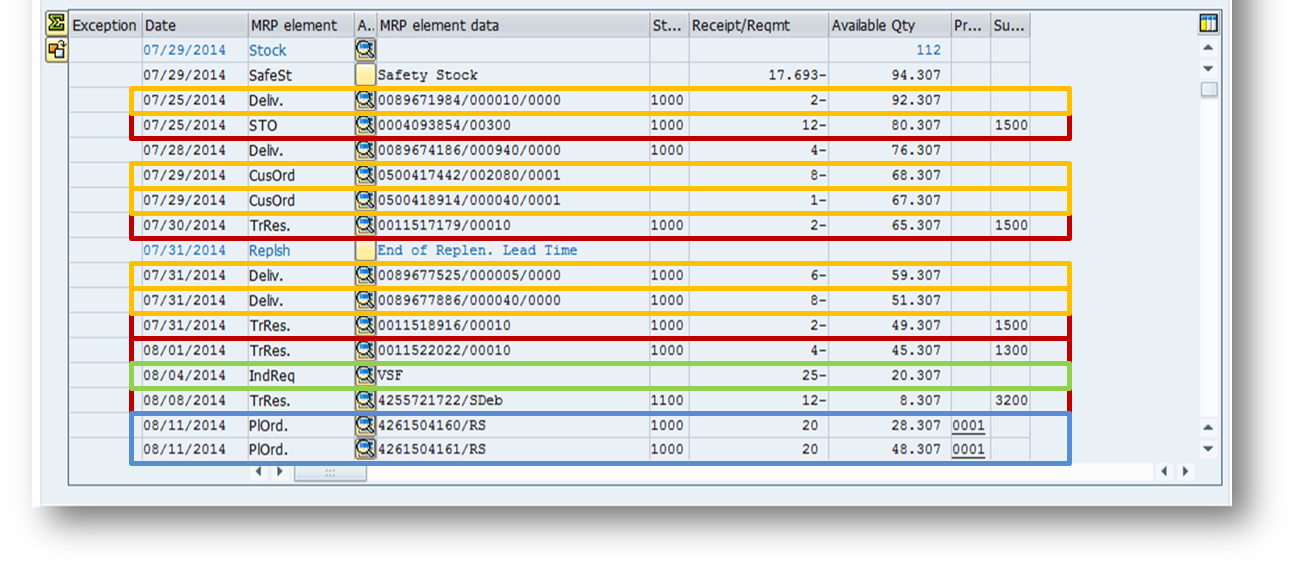
When you set a safety stock level in the MRP2 screen of the material master it is subtracted from available inventory in the MD04 stock / requirements list. Therefore the MRP run ignores that part of the inventory. Imagine the following situation: There is a forecast of 50 pieces for next month and you have maintained a safety stock of 30 pieces. The system will plan to have an inventory of 80 pieces in stock at the beginning of next month. As we are approaching the next month and actual customer orders drop in, the forecast is replaced by actual orders. Should the actual order exceed the forecast - lets say that customers demand 60 pieces instead of 50 - the MRP run will generate a new replenishment proposal for an extra 10 (instead of using the safety stock) and you end up with 90 pieces in inventory, even though you only need 60.

This type of behavior creates dead stock and misses the purpose of using a safety stock as a buffering strategy. The situation worsens if you have a rounding value or a fixed lot size.

So what can you do? Use a range of coverage profile that drives a dynamic safety stock if the situation allows for it. In a range of coverage profile you have a target safety coverage and a minimum safety coverage (in days of coverage). The MRP run can 'see' the safety levels and ONLY generates a replenishment order when the minimum safety coverage is broken. Therefore you have to make sure that the minimum safety coverage is set to 1 day and the target is higher. In that case the MRP planning run uses all the days in the target coverage as a buffer to counter demand variability.

By the way... the range of coverage also has a maximum safety coverage to keep the inventory from blowing up, should the forecast be too high.

Monday, August 4, 2014

setting safety stock levels in line with the supply chain strategy

one of the critical success factors in supply chain management is the correct translation of a supply chain strategy into materials planning policies. Take as an example a directive to provide a certain service level to the customers. Management might say "we want to achieve a 98% fill rate on our most valuable products" (usually A items).

What usually happens then, is that every materials planner figures out how much inventory they need to hold and what replenishment policy to use to achieve that. If you want to standardize this kind of directive and develop a system to have everybody use the same calculation, I suggest you use the field 'service level' in MRP2 and calculate the safety stock setting for each material using the variables lead time, mean absolute deviation and a safety factor. 

You can do this on the forecasting screen of the material master. Depending on how you configured your MRP type, the forecast run can calculate  safety stock level for you. However, you have to kind of doing this for every material and you can only simulate exactly one service level.

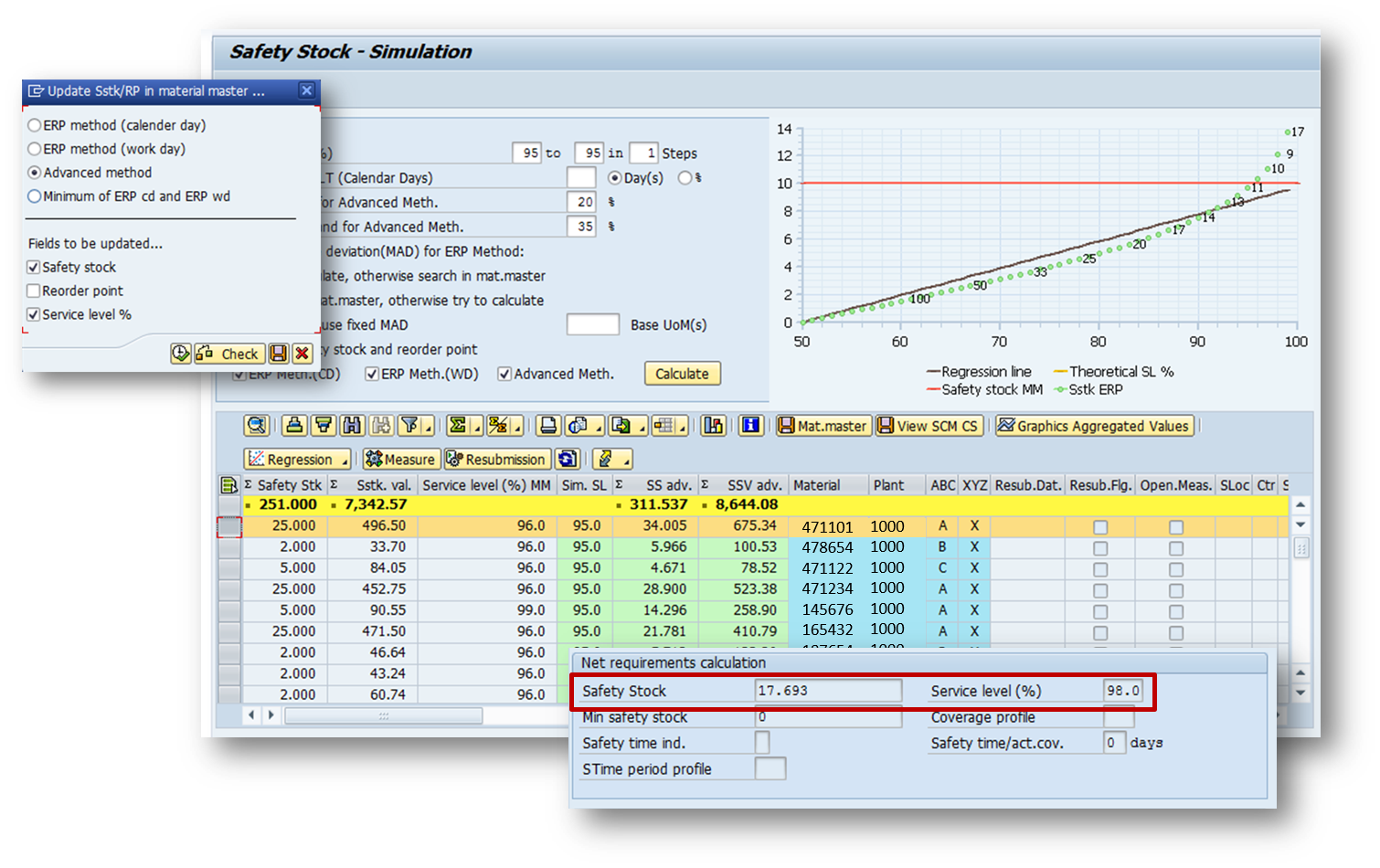
A better solution is the SAP Add-On Tool 'Safety Stock and Reorder Point Simulator'. With it you;re also getting a new KPI: safety stock value! You can also simulate many service levels and compare the results in terms of quantity and value. On top of everything else, the safety stock calculation gives you two more - very important - parameters: the variation in replenishment lead time and a variation in demand.

Let's say management desires a service level to the customer of 95%. In that case you would pull all those materials into the simulator, set 95% nd your variation in lead time demand and click the 'calculate button. The simulator then calculates all safety stock individually for each materials and totals the value. This way you can determine what a 95% service levels means compared to your current master data settings or to other service levels. In our example, all materials currently have a service level of 96% which, with the manual calculation the materials planner was using, produced a value of $7,342 in safety stocks. However, the safty stock simulator produces a value that's higher with a lesser service level... and that calculation is using the same variables for each material across the board and therefore probably much more accurate than what the planner ever can come up with - possibly applying different methods and being totally overwhelmed doing this for hundreds, if not thousands of materials.

In the end, you push the save button and safety stock and service level are being updated into the MRP2 screen for each and every material in the list.

Management changes their mind tomorrow? no problem!

Saturday, August 2, 2014

how to use detailed scheduling in SAP-REM for the automated generation of a weekly production program

One of my favorite clients runs a mix of production orders and repetitive manufacturing. As I visited their distribution center last week, I saw that they have a fairly simple assembly and kitting operation going on in the warehouse before the ship bundled spare part kits to the customer or the manufacturing plants.

My suggestion was to use repetitive manufacturing for the scheduling of the assemblies (and kitting) to make it easy and automated. With only little customizing necessary, we put the whole thing together within 3 days. Actually, the only customizing effort that was required was for the layout key and a setup matrix (using setup group category and setup group key), so that we can dispatch a sequence that is build automatically according to 'like' setups.

The first thing we did was switching from reorder planning to the deterministic PD. the previous V1 had the effect that inventory holdings (how much to put into the reorder level) had to be calculated based on the two demand sources:
- Stock transport order requests from Manufacturing Plants
- After Market requests from Customers
With a changing demand situation it was very difficult to find the right reorder point and assembly was only triggered when a reorder point was broken. Since then a forward scheduling is executed, the inventory left, after the reorder point was broken, had to be enough to fulfill the demand. This is a very difficult planning situation and requires a lot of inventory.

That is why we decided to plan these products with PD, where future demands (from STOs or customer orders) result in the generation of supply orders in exactly the quantity and exactly the date, they are demanded. Using safety stock to buffer any variation in lead time and demand, we can now schedule production to exactly meet demand. With a fixed lot size FX that corresponds in quantity to the smallest possible run, the MRP run generates supply proposals into the order pool that are a multiple of the minimum run quantity. In scheduling we can then flexibly sequence run quantities in feasible lot sizes

after the MRP run you can then see all the various demand elements in MD04 and the supply that covers them.
Now we can move onto scheduling and in MF50 we can see - tabular or graphically how MRP, which works without any consideration of capacity, sequence or material component availability, fills the pool of orders.
using the previously customized layout key for sequencing according to 'like' setups, we can now simply select three weeks worth of orders and click the 'dispatch button. The system uses the sequencing profile and first sorts all the orders and builds a sequence, then it distributes the orders within the limits of available capacity defined in the individual work orders.

Note that there are three work centers that can be scheduled. If you define alternative routings and production versions, you can use the dispatching strategy in a way that, in case of missing capacity, the dispatching can resort to another work center and therefore perfectly distribute the orders.

since we are working with repetitive manufacturing, there is no need for a planned order conversion to production orders. The orders you see here are executable. Now you may perform a collective availability check using MDVP on the schedule and expedite missing parts for next week.

All that's left is MF51 where you can prnt the schedule and hand it to the operator who will be happy to receive instructions on a feasible plan that's checked for capacity and materials availability.